
OLM Converter Tool

Most Trusted OLM Converter tool to Convert Mac OLM files to 25+ formats with 100% accuracy.
(Average Rating 4.7 Based on 592 Reviews)

Way2Migration OLM Converter is an industry-leading Mac Outlook OLM Converter designed to convert and migrate OLM to PST and multiple formats, including EML, EMLX, MSG, MBOX, ICS, VCF, PDF, HTML, and CSV. The tool also supports direct migration to Gmail, Office 365, Yahoo Mail, Thunderbird, and IMAP accounts. It guarantees zero data loss, preserving every email, attachment, folder hierarchy, and complete metadata exactly as they exist in the original Mac Outlook profile.

Test all premium features and convert up to 25 emails per folder with the free demo version.
Try the OLM Converter Tool for free highly recommended before purchase!
  • Convert OLM to 25+ Formats: Export Mac Outlook OLM files to PST, PDF, EML, EMLX, MSG, MBOX, HTML, CSV, ICS, VCF, and more.
  • Migrate to Email Clients: Directly migrate OLM files to Gmail, Office 365, Yahoo Mail, Thunderbird, IMAP, and other email platforms.
  • Complete Mailbox Export: Convert all mailbox items including Inbox, Sent Items, Drafts, Contacts, Calendars, Tasks, and Notes.
  • Batch OLM Conversion: Add and convert multiple OLM files simultaneously for faster and efficient processing.
  • Preview Before Conversion: Preview emails, attachments, contacts, and calendars before starting the export process.
  • Remove Duplicate Emails: Automatically detect and remove duplicate emails based on subject, sender, recipient, and date.
  • Attachment Management Options: Save attachments separately or exclude them during the conversion process as needed.
  • Split Large Output Files: Split large OLM files into smaller, manageable sizes during OLM to PST conversion.
  • Preserve Folder Structure: Maintains original folder hierarchy, email formatting, and metadata without any changes.
  • Selective Data Migration: Apply filters to convert or migrate specific data based on date range, subject, or folders.
  • Wide Compatibility: Supports all Mac Outlook OLM files and works seamlessly on Windows 11, 10, 8.1, 8, and 7.

Why Choose Way2Migration OLM Converter?

What Can the Way2Migration OLM Converter Tool Do for You?

Mac Outlook OLM Converter to PST

Direct OLM to Office 365 Migration

OLM to Gmail Migration

OLM to IMAP Migration

OLM to CSV Conversion

OLM to PDF Conversion

OLM to EML Conversion

Features & Technical Highlights of the Way2Migration OLM Converter Tool

Explore the advanced capabilities and performance benefits that make this OLM Converter Tool reliable, secure, and efficient for Mac Outlook data migration.

Multiple OLM File Conversion Options

The Way2Migration OLM Converter allows you to export Mac Outlook OLM files into 30+ file formats, including PST, EML, EMLX, MSG, MBOX, PDF, HTML, CSV, ICS, and VCF. It also supports direct migration to popular email platforms such as Windows Outlook, Office 365, Gmail, Yahoo Mail, Thunderbird, Exchange Server, and IMAP, ensuring broad compatibility across desktop and cloud environments.

Retains Original Data Integrity

The tool ensures complete preservation of all mailbox components during conversion. Email headers (To, From, CC, BCC), subject lines, timestamps, attachments, and metadata remain intact. The original folder hierarchy and mailbox structure are maintained exactly as in the Mac Outlook profile, guaranteeing zero data loss.

Fast And Efficient Bulk OLM Conversion

With its batch conversion feature, users can convert multiple OLM files simultaneously. This saves time, reduces manual effort, and makes the software ideal for enterprises, IT administrators, and users handling large Mac Outlook mailboxes.

Preview Mac Outlook Data Before Export

The built-in preview mode allows users to view emails, attachments, contacts, calendars, tasks, and notes before conversion. This ensures transparency, accuracy, and control, helping users avoid exporting unwanted data.

Split Large PST Output Files Easily

During OLM to PST conversion, the tool offers an option to split large PST files into smaller, manageable sizes. This improves Outlook performance, prevents file corruption, and simplifies mailbox management.

Advanced Filtering Options

The software provides smart filters that allow selective OLM email migration based on date range, sender, recipient, subject, or specific folders. This helps in exporting only relevant data and minimizes unnecessary storage usage.

Compatible with All OLM File Types

Way2Migration OLM Converter fully supports all Mac Outlook OLM file versions created by different Outlook for Mac editions, ensuring smooth migration regardless of mailbox size or Outlook version.

Keeps Attachments & Embedded Media Intact

All attachments, inline images, hyperlinks, and embedded media are preserved in their original quality and structure. Users also have the option to save attachments separately for easier access and storage.

Simplified & Intuitive Interface

Designed with a clean and easy-to-use interface, the tool requires no technical expertise. Even non-technical users can convert or migrate OLM files with just a few clicks.

Seamless Cloud And Email Client Migration

The tool enables direct migration of OLM files to Office 365, Gmail, Yahoo Mail, Exchange Server, IMAP, and Thunderbird, eliminating the need for manual uploads or complex configuration steps.

One Tool, Endless Export Options for Way2Migration OLM Converter

Convert Mac Outlook OLM files into multiple file formats effortlessly with one powerful and reliable solution.

Supported Export Formats & Capabilities

  • PST – Convert Mac Outlook OLM files into Windows Outlook PST format for seamless migration, backup, and mailbox management.
  • PDF – Save Mac Outlook emails as PDF documents for easy printing, secure sharing, and offline access.
  • TXT – Export emails to plain text (TXT) format for a clean, readable version of mailbox content.
  • MSG – Convert OLM emails into MSG format to maintain full compatibility with Microsoft Outlook.
  • MBOX – Export OLM emails to MBOX format, compatible with email clients like Thunderbird, Apple Mail, SeaMonkey, and others.
  • HTML – Save emails in HTML format to view them in any web browser with original formatting preserved.
  • EMLX – Convert OLM files to EMLX format, supported by Apple Mail on macOS systems.
  • MHTML – Export emails as MHTML web archive files, preserving email content, formatting, and attachments in a single file.
  • DOCX – Save emails as Microsoft Word (DOCX) documents for easy editing, documentation, and record keeping.
  • RTF – Export Mac Outlook emails to Rich Text Format (RTF) while retaining text styling and layout.
  • CSV – Convert Outlook contacts and mailbox data to CSV format for use in Excel, CRM systems, or contact management tools.
  • VCF – Export Mac Outlook contacts to vCard (VCF) format for seamless use across devices and applications.
  • ICS – Export calendar items, meetings, and schedules to iCalendar (ICS) format, compatible with Outlook, Google Calendar, and other calendar apps.
  • JPG – Save email snapshots or attachments as high-quality JPG images.
  • PNG – Export embedded images and attachments to PNG format, maintaining clarity and transparency.
  • GIF – Convert image-based email content or attachments into GIF format for easy sharing and animation support.
  •  

Get the Full Version of Way2Migration OLM Converter Tool.

Select your preferred license to start your migration journey

Single License

$99
$ 39
  • 2 Machine
  • Personal use only
  • License Validity - 1 Year
  • Convert single or multiple OLM files at once .
  • Convert OLM files to formats such as PST, EML, MSG, CSV, MBOX, EMLX, HTML, and more.
  • Display a preview of the OLM file.
  • Remove duplicate emails based on criteria like To, From, Bcc, Subject, and Body.
  • Utilize the Date Range option to filter emails.
  • Maintain the folder hierarchy during conversion.
  • Migrate or back up emails without attachments.
  • Free support service(24*7) one year
  • Auto upgrade available

Business License

Best Seller
$149
$ 99
  • Up to 5 Machines
  • License Validity – 2 years.
  • All features included in Single User License + Export OLM files to PDF, DOC, DOCX, DOCM, TIFF, PNG, GIF, JPG, and other formats.
  • Import OLM files to Gmail, Office 365.
  • Remove duplicate emails based on criteria like To, From, Bcc, Subject, and Body.
  • Utilize the Date Range option to filter emails.
  • Display a preview of the OLM file.
  • Maintain the folder hierarchy during conversion.
  • Migrate or back up emails without attachments.
  • Free support service(24*7) 2 year .
  • Auto upgrade available

Enterprise License

$199
$ 149
  • Upto 15 Machine
  • License Validity - Lifetime
  • All features included in Business License + Export OLM files to PDF, DOC, DOCX, DOCM, TIFF, PNG, GIF, JPG, and other formats.
  • Import OLM files to Gmail, Office 365, AOL, IMAP, Yahoo Mail, Thunderbird, and other email clients.
  • Display a preview of the OLM file.
  • Remove duplicate emails based on criteria like To, From, Bcc, Subject, and Body.
  • Utilize the Date Range option to filter emails.
  • Maintain the folder hierarchy during conversion.
  • Migrate or back up emails without attachments.
  • Auto upgrade available

Advanced License

$349
$ 229
  • Upto 30 Machine
  • License Validity - Lifetime
  • All features included in Business License + Export OLM files to PDF, DOC, DOCX, DOCM, TIFF, PNG, GIF, JPG, and other formats.
  • Import OLM files to Gmail, Office 365, AOL, IMAP, Yahoo Mail, Thunderbird, and other email clients.
  • Display a preview of the OLM file.
  • Remove duplicate emails based on criteria like To, From, Bcc, Subject, and Body.
  • Utilize the Date Range option to filter emails.
  • Maintain the folder hierarchy during conversion.
  • Migrate or back up emails without attachments.
  • Free support service(24*7) lifetime
  • Auto upgrade available

How to Convert OLM to PDF — Complete Step-by-Step Guide

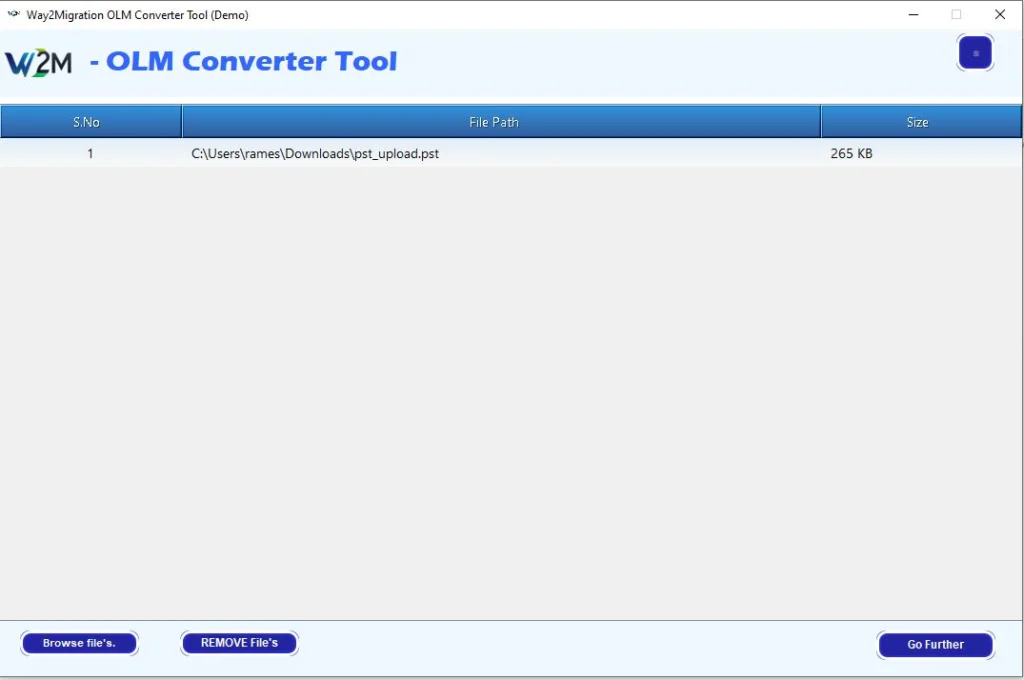
Add OLM Files or Folders

Easily add single or multiple OLM files or entire folders containing OLM files.
The tool automatically lists all added OLM files along with their sizes and paths.
Preview Mailbox Data

Once the OLM file is loaded, the tool displays a complete mailbox tree structure.
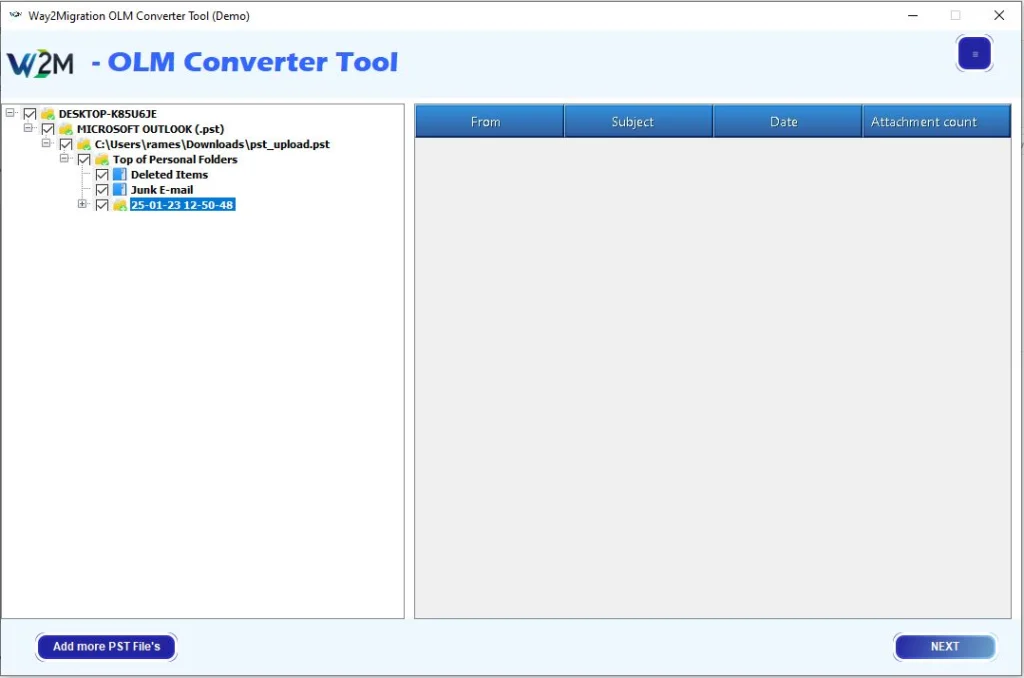
  • Select any folder (Inbox, Sent Items, etc.) to view its contents.
  • Double-click any email in the preview panel to view detailed information such as From, Subject, Date, and Attachments.

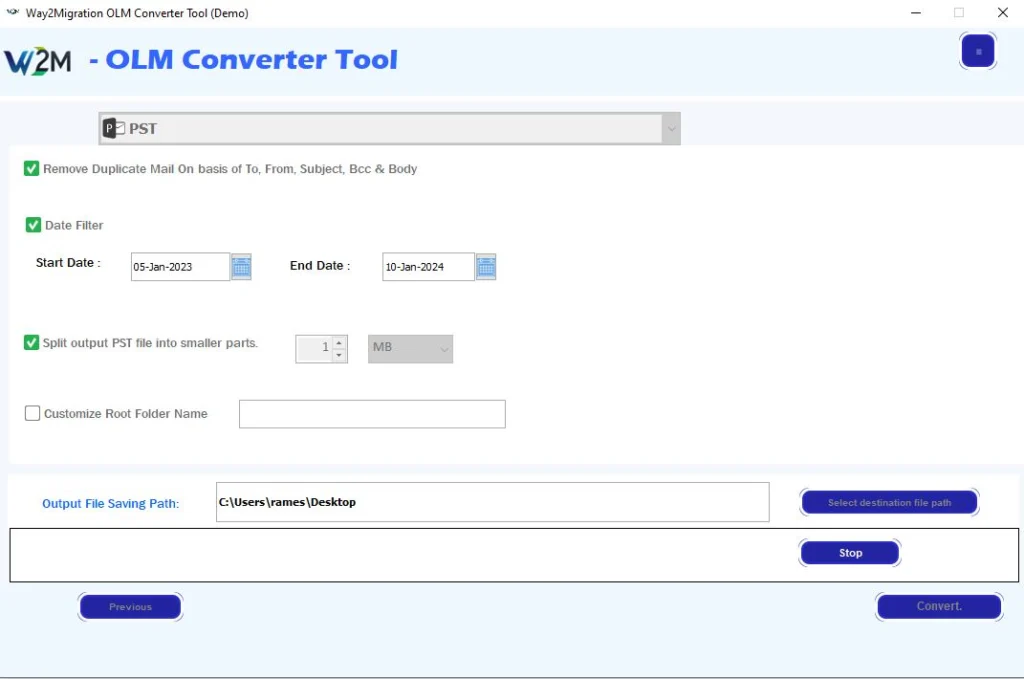
Apply Advanced Filters & Choose Output Format

Customize your conversion using advanced filters:

  • Remove Duplicate Mails (based on To, From, Subject, Bcc, and Body)
  • Date Filter to convert emails within a specific date range
  • Split PST File by size, date, or folder
  • Save Attachments Separately
  • Choose from multiple export formats like PST, PDF, EML, EMLX, MSG, MBOX, CSV, Office 365, and more.

Finally, select the destination path and click “Convert” to start the process.
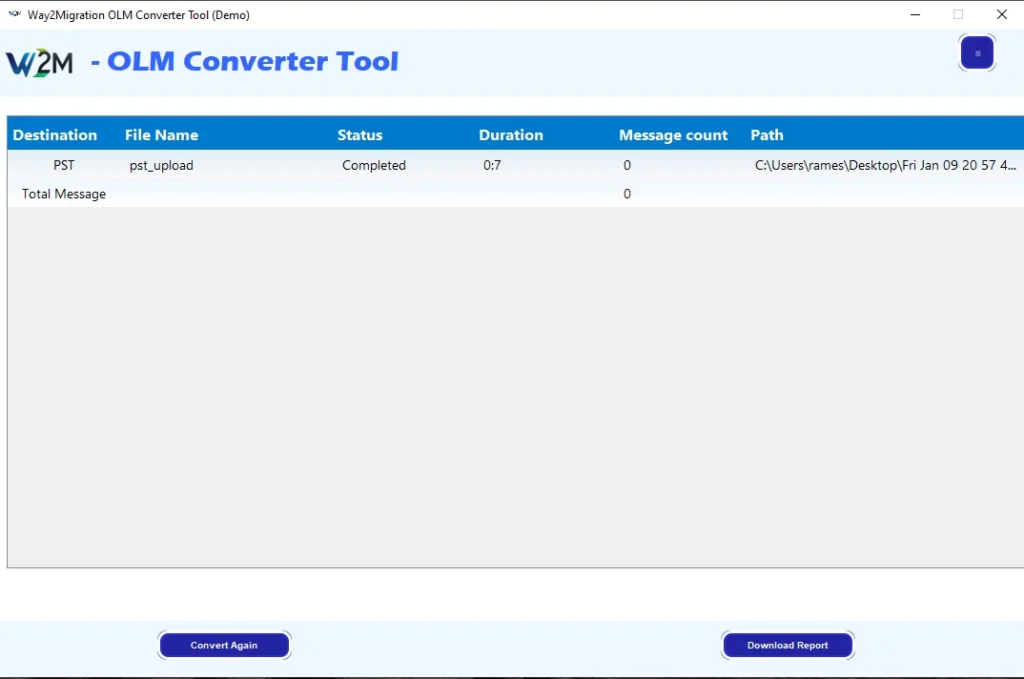
View Conversion Report

After the process completes, a detailed conversion report is displayed.
  • View file name, format, duration, message count, and saved path.
  • Click “Download Report” to save a copy or “Convert Again” to process another file.

Software Prerequisites & Recommendations

Request For Software Customization

Note: If you require any modifications or additional functionalities in Way2Migration Software, please share your requirements through our Customization Request Form or Live chat support . Our team will analyze your needs and provide a personalized quote.
Operating System Windows 11, 10, 8.1, 8, 7 (32-bit & 64-bit)
Processor Intel® Pentium® 1 GHz or higher
RAM (Memory) Minimum 2 GB (4 GB or more recommended)
Hard Disk Space Minimum 100 MB of free space required for installation
Microsoft Outlook Installation of Outlook is recommended for better PST file compatibility (not mandatory for conversion)
Administrative Rights Required for installation and activation of the software
Internet Connection Recommended for license activation and software updates
Other Requirements Ensure sufficient storage space for saving converted files
Security Settings Temporarily turn off antivirus and Windows Firewall during installation or activation to prevent interference with setup.

OLM Converter Tool – Free vs Full Version

Features Free Version Full Version
Convert OLM files to EML, MSG, CSV, MBOX, EMLX, HTML, PDF, DOC, DOCX, DOCM, TIFF, PST PNG, GIF, JPG, etc. ✔ Available ✔ Available
Fast & Advanced Scanning Modes ✔ Available ✔ Available
Preview of OLM Emails & Attachments ✔ Available ✔ Available
Migrate or Backup Emails Without Attachments ✔ Available ✔ Available
Remove Duplicate Emails (To, From, Bcc, Subject, Body) ✔ Available ✔ Available
Maintain Folder Hierarchy ✔ Available ✔ Available
Naming Convention ✔ Available ✔ Available
Date Filter ✔ Available ✔ Available
Import OLM File to Gmail, Office 365, AOL, IMAP, Yahoo Mail, Thunderbird, etc. ✔ Available ✔ Available
Supports All Windows Versions (11, 10, 8, 7 – 32/64 Bit) ✔ Supported ✔ Supported
Convert OLM Data to Multiple Formats (70+ Options) 25 Items / Folder Unlimited Conversion
Save & Export OLM Data 25 Items / Folder ✔ Full Export Access
Free Updates & Technical Support ❌ Not Included ✔ Included
Cost FREE $29.00
Reviews

What Our Clients Say

Frequently Asked Questions - OLM Converter Tool

Way2Migration OLM Converter Tool is a professional OLM file converter software that helps users convert and migrate Mac Outlook OLM files to PST, multiple file formats, and email clients like Office 365 and Gmail with complete data accuracy.

Yes, the tool allows you to convert OLM to PST while preserving emails, attachments, folder hierarchy, and metadata. The generated PST file is fully compatible with all Windows Outlook versions.

Yes, Way2Migration supports direct OLM to Office 365 migration, allowing users to move Mac Outlook emails, contacts, calendars, and attachments directly into Microsoft 365 accounts without data loss.

Absolutely. The tool enables secure OLM to Gmail migration, ensuring all Mac Outlook emails and attachments are transferred accurately using authenticated login.

The software supports 30+ export formats, including PST, PDF, EML, EMLX, MSG, MBOX, HTML, CSV, DOCX, RTF, ICS, VCF, JPG, PNG, GIF, and more.

Yes, during OLM email migration, the tool maintains original folder hierarchy, sender/receiver details, subject lines, timestamps, formatting, and attachments exactly as in the source OLM file.

Yes, Way2Migration OLM Converter provides a preview option that allows users to view emails, attachments, contacts, and calendars before starting the conversion or migration process.

Yes, the tool supports batch OLM conversion, allowing users to add and convert multiple Mac Outlook OLM files at once, saving time and effort.

Yes, advanced filters allow selective OLM migration based on date range, subject, sender, or specific folders, helping users export only required data.

No, Microsoft Outlook installation is not required to convert OLM files using Way2Migration OLM Converter Tool.

The software works seamlessly on Windows 11, 10, 8, and 7, supporting both 32-bit and 64-bit systems.

Yes, Way2Migration provides a free demo version that allows users to preview and evaluate the OLM Converter Tool before purchasing the full license.